package.json にコマンド"dist": "electron-builder"を追記。
さらにビルド設定を追記※20行目あたり。
特に、buildプロパティのappIdは非常に重要。
ここできちんと明記することでOSが正しくアプリとして認識できるようになります。
com.を先頭に記述するのは慣行のようです。
{
	"name": "shv-reminder",
	"version": "1.1.0",
	"description": "Simple Reminder",
	"main": "main.js",
	 "type": "module",
	"scripts": {
		"dev": "cross-env NODE_ENV=development electron .",
		"start": "cross-env NODE_ENV=production electron .",
		"dist": "electron-builder"
	},
	"keywords": [],
	"author": "Studio Happyvalley",
	"license": "ISC",
	"devDependencies": {
		"cross-env": "^10.1.0",
		"electron": "^38.1.2",
		"electron-builder": "^26.0.12"
	},
	"build": {
		"appId": "com.shv.reminder",//ここのidは非常に重要
		"productName": "SHV Reminder",
		"win": {
			"target": "nsis",
			"icon": "icon.ico"
		},
		"nsis": {
			"oneClick": false,
			"perMachine": false,
			"allowToChangeInstallationDirectory": true,
			"createDesktopShortcut": true,
			"createStartMenuShortcut": true,
			"runAfterFinish": true
		}
	}
}
今回requireからimportへの変更、保存ディレクトリの共有化、preload.jsの設定など修正箇所が多いのでほぼ全体修正となります。
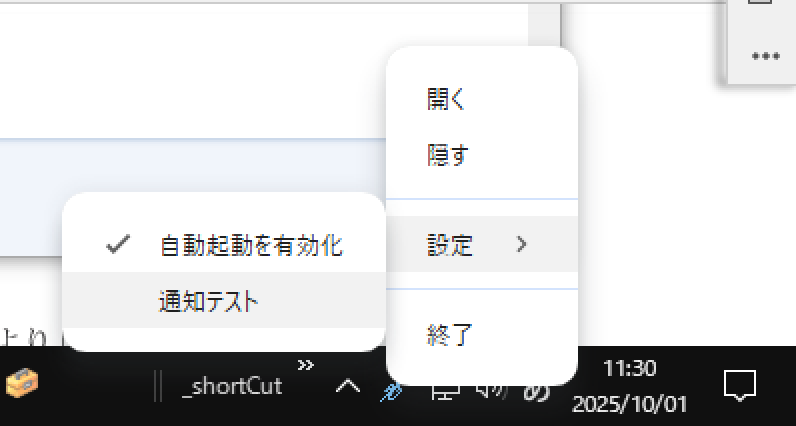
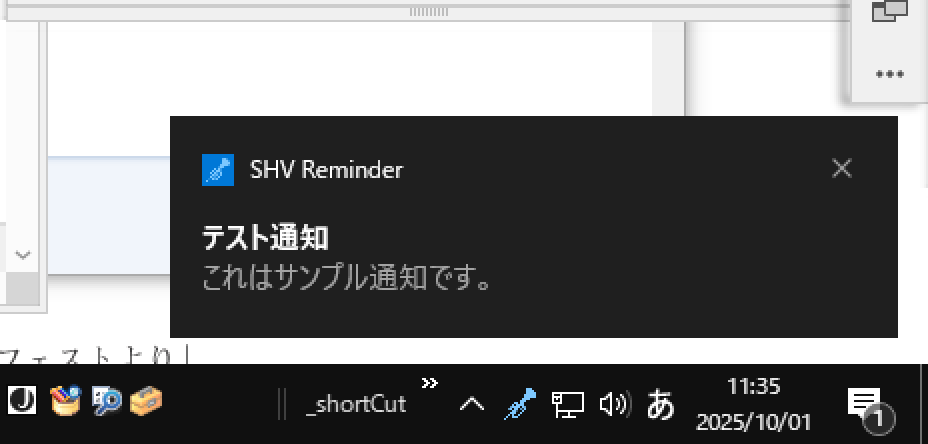
またタスクメニューも大幅に追加しました。簡易的に通知のテストができるようにテスト通知のコマンドもいれました。
かなり長いですから、説明が必要と思われる箇所にはコメントを入れて有ります。
import { app, BrowserWindow, ipcMain, Notification, Tray, Menu } from "electron";
import path from "path";
import { fileURLToPath } from "url";
const __filename = fileURLToPath(import.meta.url);
const __dirname = path.dirname(__filename);

// アプリ用の保存先を「shv-reminder」に固定
app.setAppUserModelId("com.shv.reminder");
app.setPath("userData", path.join(app.getPath("appData"), "shv-reminder"));

let tray = null;
let mainWindow;

function createWindow() {
  mainWindow = new BrowserWindow({
    width: 1000,
    height: 800,
    icon: path.join(__dirname, "icon.ico"),
    webPreferences: {
      preload: path.join(__dirname, "preload.js"),
      nodeIntegration: false,
      contextIsolation: true,
      sandbox: false
    }
  });

  // レンダラから保存先を問い合わせできるようにする
  ipcMain.handle("get-user-data-path", () => {
    return app.getPath("userData");
  });

  mainWindow.loadFile("index.html");

	//closeイベントをフック(×を押したとき終了させない)
	mainWindow.on("close", (event) => {
		event.preventDefault();   // デフォルトの終了を止める
		mainWindow.hide();        // ウィンドウを隠す(タスクトレイに残る)
	});

  tray = new Tray(path.join(__dirname, "icon.ico"));
  const contextMenu = Menu.buildFromTemplate([
    { label: "開く", click: () => mainWindow.show() },
	{ label: "隠す", click: () => mainWindow.hide() },
	{ type: "separator" },
		{
		label: "設定",
		submenu: [
			{
				label: "自動起動を有効化",
				type: "checkbox",
				checked: true,
				click: (menuItem) => {
					app.setLoginItemSettings({
						openAtLogin: menuItem.checked,
						path: process.execPath,
					});
				}
			},
			{
				label: "通知テスト",
				click: () => {
					new Notification({ title: "テスト通知", body: "これはサンプル通知です。" }).show();
				}
			}
		]
	  },
	  { type: "separator" },
	  {
		label: "終了",
		click: () => {
		  tray.destroy();
		  app.quit();
		}
	  }

  ]);
  tray.setToolTip("SHV Reminder");
  tray.setContextMenu(contextMenu);
}
//通知イベント
ipcMain.on("show-reminder", (event, { title, body, meta }) => {
	const notification = new Notification({ title, body });
  notification.show();

  // 通知が来たらアイコンを赤丸付きに変える
  tray.setImage(path.join(__dirname, "icon-alert.ico"));

});
ipcMain.on("update-badge", (event, count) => {
  app.setBadgeCount(count);
});

//アプリを開いたら通常アイコンに戻す
app.on("browser-window-focus", () => {
  if (tray) {
    tray.setImage(path.join(__dirname, "icon.ico"));
  }
});

app.whenReady().then(() => {
  createWindow();

  app.on("activate", () => {
    if (BrowserWindow.getAllWindows().length === 0) createWindow();
  });
});

app.on("window-all-closed", () => {
  if (process.platform !== "darwin") app.quit();
});
preload.jsをプロジェクト直下に配置します。
これまでレンダ側で行っていたデータの保存と読み込みなどを行います。
また、両環境のイベントのやり取りなども行います。
mport { contextBridge, ipcRenderer } from "electron";
import path from "path";
import fs from "fs";
import { fileURLToPath } from "url";
const __filename = fileURLToPath(import.meta.url);
const __dirname = path.dirname(__filename);

let dataDir = null;

ipcRenderer.invoke("get-user-data-path").then((userDataPath) => {
  dataDir = path.join(userDataPath, "data");
  if (!fs.existsSync(dataDir)) fs.mkdirSync(dataDir, { recursive: true });
});

contextBridge.exposeInMainWorld("electronAPI", {
	// JSON 読み込み
	readJSON: (filename) => {
		const pathinfo = {
			"package.json": () => {
				const __dirname = path.dirname(__filename);
				return path.join(__dirname, `${filename}`);
			},
			default: () => {
				return path.join(dataDir, `${filename}`);
			}
		};
		try {
			const fn = pathinfo[filename] ?? pathinfo.default;
			const filePath = fn();
			if (!fs.existsSync(filePath)) return {};
			return JSON.parse(fs.readFileSync(filePath, "utf-8"));
		} catch (err) {
			return {};
		}
	},
	updateBadge: (count) => ipcRenderer.send("update-badge", count),
	// JSON 書き込み
	writeJSON: (filename, data) => {
		try {
			const filePath = path.join(dataDir, filename);
			fs.writeFileSync(filePath, JSON.stringify(data, null, 2), "utf-8");
		} catch (err) {
		}
	},
	//通知を main に依頼
	sendReminder: (title, body, meta) => {
		ipcRenderer.send("show-reminder", { title, body, meta });
	},

	// 通知サポート有無
	canNotify: () => ipcRenderer.invoke("can-notify"),

	//タスクアイコンから予定追加処理
	onOpenAddNote: (callback) => ipcRenderer.on("open-add-note", callback),

	//通知先の予定を選択
	onFocusNote: (callback) =>
	ipcRenderer.on("focus-note", (event, data) => {
		callback(data);
	}),
});

contextBridge.exposeInMainWorld("appEnv", {
  NODE_ENV: process.env.NODE_ENV
});
index.htmlのjavascriptは半分くらいをメインプロセスへ移すので半分くらいになります。
//旧
const { ipcRenderer } = require("electron");
const path = require("path");
const fs = require("fs");


let currentUserKey = 'cal-default';


let dataDir = null;
let dataFile = null;
(async () => {
	dataDir = await ipcRenderer.invoke("get-user-data-path");
	if (!fs.existsSync(dataDir)) {
		fs.mkdirSync(dataDir, { recursive: true });
	}
	dataFile = path.join(dataDir, `${currentUserKey}.json`);
})();

//新
const state={
	current: new Date(),
	currentIndex: 0,
	days: '',
	date: '',
	currentUserKey: 'cal-default'
};
startReminder関数の最初の箇所に再チェック用に変数を追加し、処理が重複しないようにします。
startReminderの起動タイミングは初期の開発ではhtmlの読み込み直後にしていましたが、予定を変更・修正した時にも再度startReminderを回す必要があるので、その時、処理が重複しないための対策です。
let reminderTimer= null;
let notified = {}; // 通知済みフラグ
function startReminder() {
	if (reminderTimer) {
		clearInterval(reminderTimer); // すでに動いていたらリセット
	}
通知処理もメイン処理に任せるので修正します。
//旧
if (now >= alertTime && now < target) {
	new Notification([`[${dateStr}/${note.time}: ${note.title}]\n${note.alertMinutes}分前のお知らせ`,
		`${note.title}\n${note.body}`
	]);
	// trayアイコン変更のリクエストをメインに送る
	ipcRenderer.send("reminder-alert");

//新
if (now >= alertTime && now < target) {
	console.log("▲通知発生", alertTime);
	window.electronAPI.sendReminder(
		`[${dateStr}/${note.time}: ${note.title}]\n${note.alertMinutes}前のお知らせ`,
		`${note.body || ""}`,
		{ dateStr, /*index: note.index,*/ title: note.title, time: note.time }
	);
データの読み込みと書きこみの箇所も下記の様に修正します。
//旧
// ディレクトリがなければ作る
function ensureDir() {
  if (!fs.existsSync(dataDir)) {
	fs.mkdirSync(dataDir, { recursive: true });
  }
}

function loadNotes() {
	ensureDir();
	if (!fs.existsSync(dataFile)) return {};
	const raw = fs.readFileSync(dataFile, "utf-8");
	return JSON.parse(raw || "{}");
}

function saveNotes(notes) {
	fs.writeFileSync(dataFile, JSON.stringify(notes, null, 2), "utf-8");
}

//新

function loadNotes() {
	return window.electronAPI.readJSON(`${state.currentUserKey}.json`);
}

function saveNotes(notes) {
	window.electronAPI.writeJSON(`${state.currentUserKey}.json`, notes);
	(async () => {
		await renderCalendar(); // 即反映
		state.days= document.querySelectorAll(".day");
		state.days[state.currentIndex].classList.add('currentday');
		startReminder();
	})();
}
一番最後に下記を追記し、カレンダーをレンダリングし、通知処理を回します。
renderCalendar();
startReminder();